
A DNS Redirection Attack (also known as DNS Hijacking) is a cyberattack where an attacker overrides a system’s Domain Name System (DNS) settings to falsely redirect traffic.
Instead of landing on the legitimate website you intended to visit, your browser is stealthily pointed to a malicious replica designed to steal credentials, install malware, or harvest personal data.
How It Works
To understand the attack, it helps to look at the normal DNS process versus the hijacked process. Normally, DNS acts like the internet’s phonebook, translating a human-friendly URL (like bank.com) into a machine-readable IP address (like 192.0.2.1).
Here is how the attack disrupts that flow:
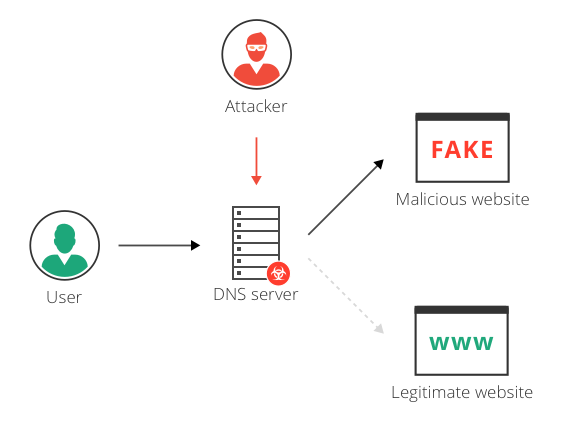
- The Request: You type a legitimate URL into your browser.
- The Interception: Instead of hitting a secure, trusted DNS server, the request is intercepted or answered by a compromised server controlled by the attacker.
- The Misdirection: The compromised server returns the IP address of a malicious website rather than the real one.
- The Trap: Your browser loads the fake site. Because the URL in your address bar might still look correct (depending on the type of attack), you may not realize you are entering sensitive data directly into an attacker’s database.
Common Types of DNS Redirection
Attackers use several methods to manipulate DNS records:
- Local DNS Hijacking: The attacker installs malware on a user’s local device (via phishing or malicious downloads) and alters the local network settings to point to a rogue DNS server.
- Router DNS Hijacking: Attackers exploit vulnerabilities or default passwords in a home or office router to overwrite its DNS settings. This impacts every device connected to that network.
- Man-in-the-Middle (MitM) Attacks: An attacker intercepts the communication between the user and the legitimate DNS server, swapping out the real IP address with a fake one on the fly.
- Rogue DNS Server: Attackers hack a legitimate DNS server directly and alter its database records (often referred to as DNS poisoning).
The Consequences
The primary goal of a DNS redirection attack usually boils down to three things:
- Phishing and Identity Theft: Creating identical clones of banking, email, or social media login pages to steal credentials.
- Malware Distribution: Automatically downloading spyware or ransomware onto the victim’s device upon visiting the redirected site.
- Ad Pharming: Redirecting users to pages filled with unwanted advertisements to generate fraudulent ad revenue for the attacker.
How to Protect Yourself
Protecting against DNS hijacking requires action at both the individual and network levels.
| Defense Strategy | Actionable Steps |
|---|---|
| Secure Your Router | Change the default admin username and password on your home router immediately. Keep its firmware updated. |
| Use Secure DNS | Switch your network or device settings to use encrypted DNS protocols like DoH (DNS over HTTPS) or DoT (DNS over TLS) through trusted providers like Cloudflare (1.1.1.1) or Google (8.8.8.8). |
| Install Endpoint Protection | Use reliable antivirus and anti-malware software to prevent local DNS-altering Trojans from infecting your machine. |
| Look for HTTPS Warnings | If a website you frequently visit suddenly triggers an SSL/TLS certificate warning in your browser, close the tab immediately. The attacker may have redirected you, but they rarely hold the valid security certificate for the real domain. |