
In Kali Linux, dnsenum is a powerful, command-line tool used for DNS enumeration.
Enumeration is the process of gathering public information about a target’s Domain Name System (DNS) records. In cybersecurity and penetration testing, this is one of the very first steps taken during the “reconnaissance” or information-gathering phase.
By finding all the subdomains, mail servers, and IP addresses associated with a target, a security professional can map out an organization’s entire digital footprint.
What Exactly Does dnsenum Do?
When you run dnsenum against a domain, it automates several tedious lookup tasks sequentially:
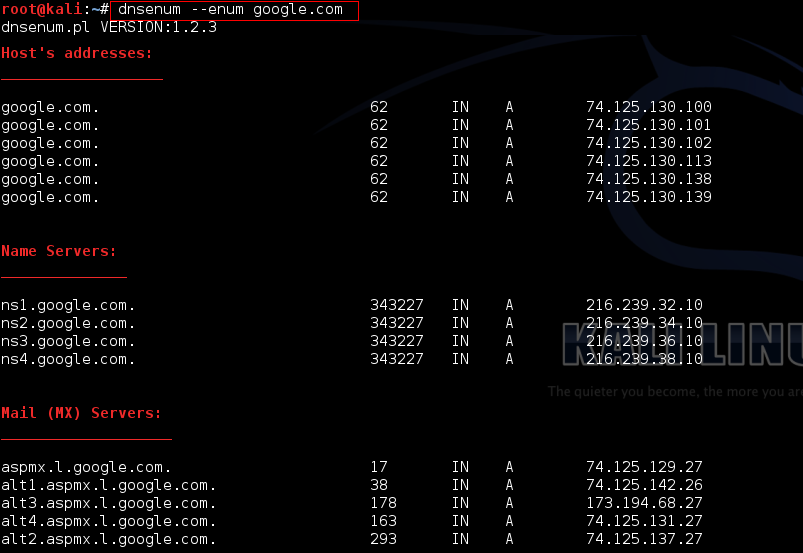
- Get Core Records: It grabs the basic host addresses (A records), Name Servers (NS), and Mail Servers (MX).
- Check for Zone Transfers: It attempts an AXFR (Zone Transfer) on the name servers. If a name server is misconfigured, a zone transfer will hand over the entire DNS map of the company like a free cheat sheet.
- Google Scraping: It scrapes search engine results to find extra subdomains that might not be listed in standard records.
- Brute Force Subdomains: It runs a wordlist (dictionary attack) against the domain to guess common subdomains (like vpn.target.com, stage.target.com, admin.target.com) and checks if they exist.
- Reverse Lookups: If it finds a network IP range, it performs reverse DNS lookups to find names for other connected servers.
Basic Usage Example
The simplest way to run it in your Kali terminal is by giving it a target domain:
dnsenum example.comIf you want to speed things up and use a custom wordlist for the subdomain brute-forcing phase, you can use the -f flag:
dnsenum --dnsserver 8.8.8.8 -f /usr/share/dnsenum/dns.txt example.comA Quick Warning: While query lookups (like asking for MX records) are perfectly passive, brute-forcing subdomains or trying zone transfers will hit the target’s servers directly. Always ensure you have explicit permission before running targeted enumeration against infrastructure you don’t own.